LiturgyGen

Mass readings missalette and Prayers of the Faithful generator for a Campus
Ministry Office. Pick the days you have a Mass — one, or a month of them — and
LiturgyGen works out the liturgical day, fetches that day’s readings, attaches
the right Prayers of the Faithful, and hands back a .docx laid out exactly
like the office’s printed missalette.
Built with Claude (Anthropic) — it wrote most of the first draft of the services
layer, the .docx builder and the React components. Who wrote what, entry by
entry, is in AI-USAGE.md.
Demo video: video link
The app — client and API on one Render service: https://liturgygen.onrender.com
(behind the accounts gate; the first visit after a quiet spell takes about a
minute while the free tier wakes up)
Health check, outside the gate: /healthz
is the process, /readyz is the database
Demo mode — the interface, no login, no server: https://damudachi.github.io/LiturgyGen/
The two links are not the same app. The Render service is the real thing: Express, PostgreSQL and the live USCCB fetch, behind a sign-in. The GitHub Pages link is the same built client with its backend simulated in your browser, so the interface can be looked at without an account — its calendar is a snapshot of September and October 2026, its readings are citations without their text, and its prayers are placeholders. See Demo mode.
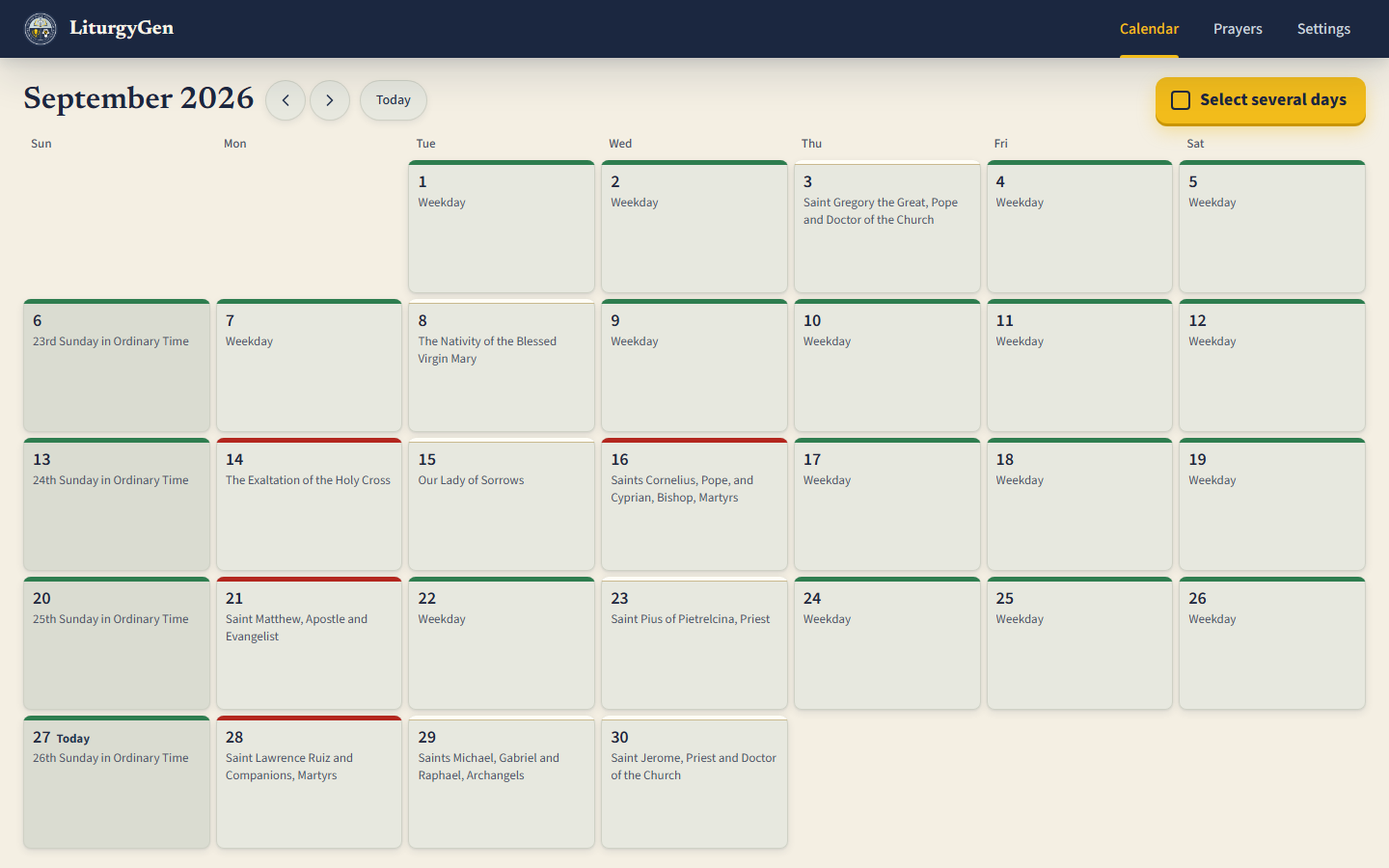
What it does
- Work out the liturgical day for any date on the Philippine particular
calendar — season, week, rank, colour — including the local celebrations the
romcallibrary does not carry. - Fetch the readings from USCCB, with Evangelizo as a fallback, a permanent on-disk cache, and a paste box for the date neither source can reach.
- Attach the Prayers of the Faithful, matched by a cascade that takes the
most specific thing that exists — the celebration, then the calendar date,
then season-and-week-and-day, down to the Ordinary Time book for the same
weekday. Six passes over the day’s own season, its ferial season and Ordinary
Time, each walking six match rules, specific prayers before any whole-season
catch-all.
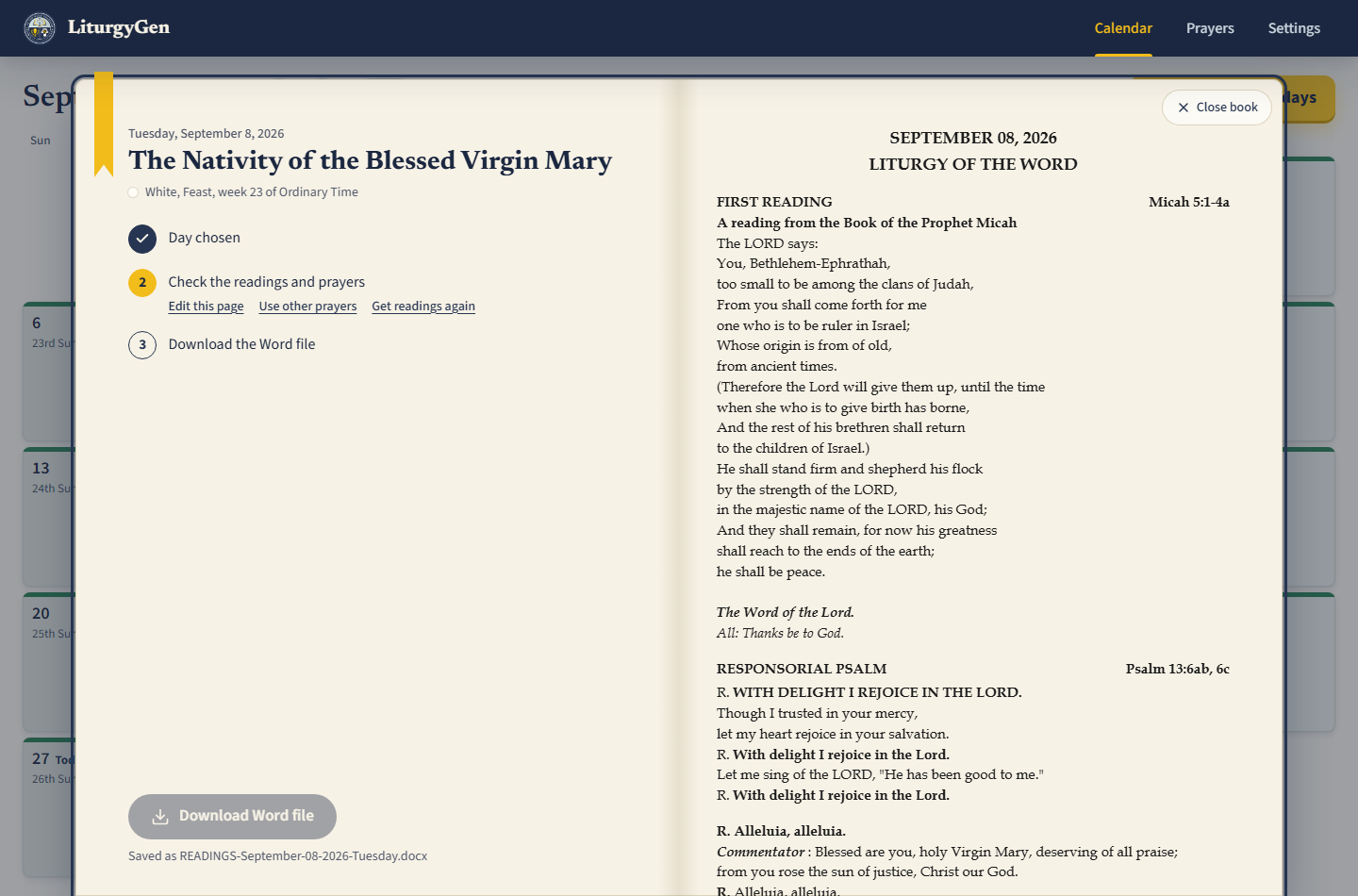
server/src/services/potfService.js. - Show the missalette as it will print, on the facing page, in the same font the Word file uses.
- Make a month at once — a ZIP of one file per day, or one master document — with the days that need a look flagged and listed first before anything is made.
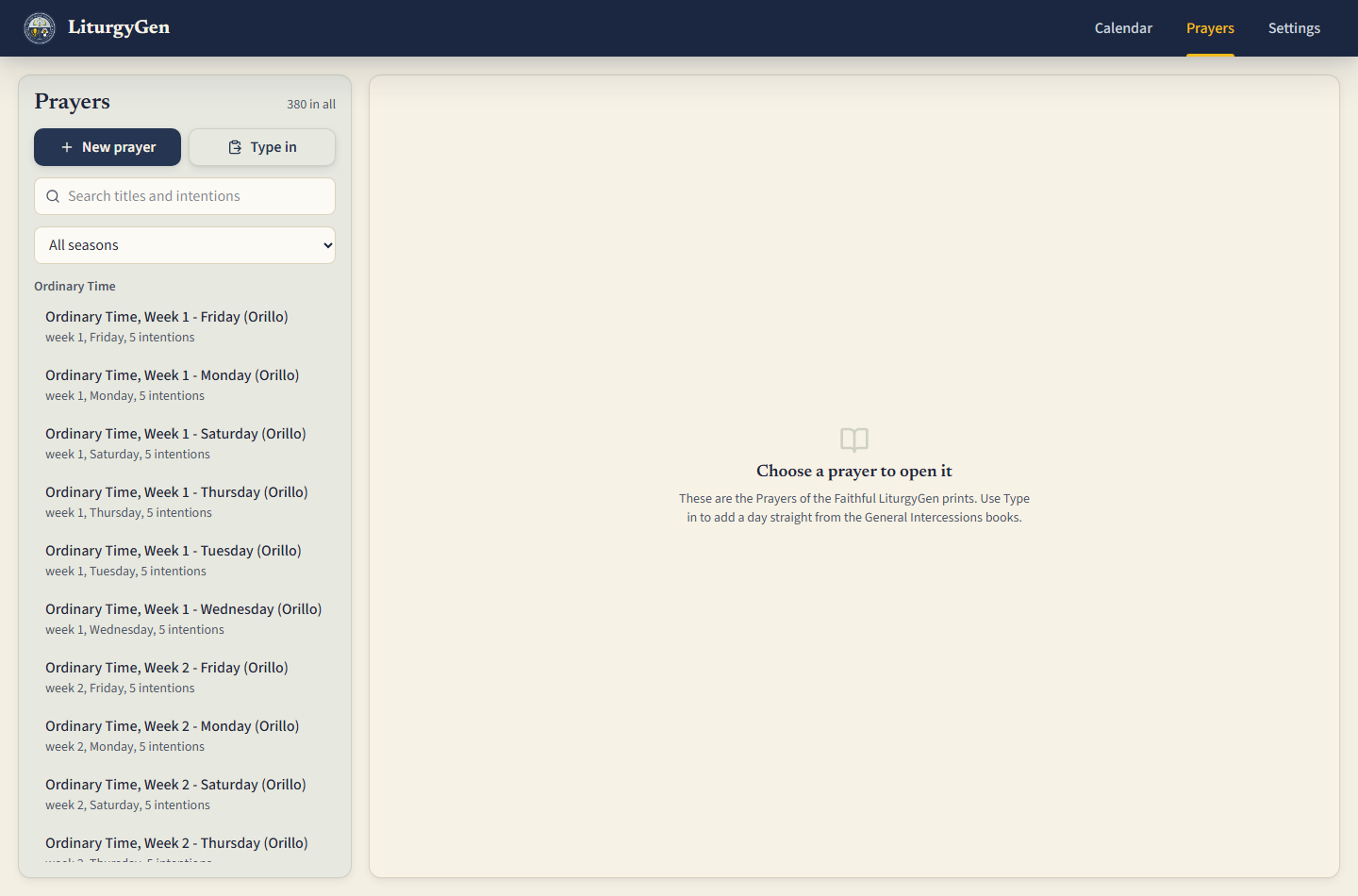
- Type the intercession books in once, from the printed page, and keep them — or hand over a PDF or a photograph of the pages and approve what is read out of it.
- Work on a phone as well as a desk. Below 768px the navbar’s four tabs move
to a fixed bottom bar; below 640px a day tile keeps only the date and the
liturgical colour. The two bars are one pair of custom properties,
--app-headerand--app-nav, so the day book always clears both. The screen map is indocs/02-mockup.md.
| The day book | The Prayers library |
|---|---|
 |
 |
Built with
React and Vite on the front end, Express and PostgreSQL on the back end.
The app runs as one Render web service - Express serves the built client and
the API from the same origin - with the database and the accounts both on
Supabase. Signing in is a screen inside the app: Supabase issues the session and
the server verifies the token and resolves which parish is asking. The landing
page, /healthz and /readyz are outside the gate and answer unauthenticated.
GitHub Pages carries a separate client-only build that runs against a seeded
snapshot in the browser, needs no account, and says so on the page.
The database was SQLite until week 3;
docs/07-postgres-migration-map.md is the
record of the move and of the six things it turned up.
There is also a Windows desktop build — the same app in its own window with a bundled Node runtime, installed per-user with no administrator rights. See Desktop build.
Demo mode
This repository runs two ways, chosen by one environment variable at build time.
Demo mode is the default. Only the exact string false turns it off, so a
forgotten or mistyped variable leaves you on the simulated backend with a
visible notice rather than on a silently broken build.
VITE_USE_MOCK_API |
What happens |
|---|---|
unset, or true |
client/src/api/mockApi.js answers every request from seed.json and localStorage. No server, no database, nothing shared between visitors. |
false |
The client calls the Express API at VITE_API_BASE_URL, which reads and writes the real database. |
The two implementations sit behind one interface in client/src/api/index.js,
so no component knows which one it is talking to.
What the demo deliberately does not have. seed.json is committed to a
public repository, so server/tools/build-demo-seed.mjs strips two things
before writing it:
- The scripture text. The readings are the New American Bible, copyright USCCB and the Confraternity of Christian Doctrine. Citations are references and are fine; the text is not ours to redistribute, so every passage is replaced with one stand-in line.
- The office’s prayers. Those are transcribed from two published ST PAULS volumes and never leave a git-ignored folder. The demo ships the placeholder prayers written for this tool instead.
GitHub Pages serves files and cannot run Node, so the API and the database can never live there.
Running it yourself
The client only, in demo mode. No database needed.
git clone https://github.com/Damudachi/LiturgyGen.git
cd LiturgyGen
npm install
cp client/.env.example client/.env      # VITE_USE_MOCK_API stays true
npm run dev:client                      # http://localhost:5173
The whole stack. Needs a PostgreSQL, local or hosted.
# 1. the database
docker compose up -d db
# or your own PostgreSQL

# 2. the API
cd server
cp .env.example .env          # check DATABASE_URL
npm run db:reset              # runs db/schema.sql then db/seed.sql
npm run dev

# 3. the client, in another terminal
cp client/.env.example client/.env
# set VITE_USE_MOCK_API=false
npm run dev:client
For a single-process run, npm run build && npm start and open
http://localhost:4000 — Express serves the API and the built client together,
which is what a deployment does. The app itself is at /app; / is the landing
page.
server/.env is read automatically, by src/loadEnv.js, which anything
with a main imports first — the pool reads DATABASE_URL at import time, so
listed second it would already be too late. It never overrides a variable that
is already set, so a host’s real environment always wins, and a missing file is
fine because on a host there isn’t one.
One consequence worth knowing: a NODE_ENV=production left in a local .env
now takes effect, and the error handler hides every 5xx message in production.
That belongs in the host’s panel, not in a file.
Check the API on its own before blaming the client:
curl http://localhost:4000/healthz      # is the process alive
curl http://localhost:4000/readyz       # is the database reachable
curl http://localhost:4000/api/calendar/month/2026/9
The office’s transcriptions are not in this repository
The prayers transcribed from the General Intercessions volumes are copyrighted, so they are kept out of version control. They belong in:
server/data/orillo/*.json # git-ignored, one file per section of the book
A checkout without them still runs: founding a parish seeds the placeholder set and reports which sections it could not find. Seeding is per parish, so the command needs to be told which one:
cd server
npm run seed -- --list                 # which parishes exist
npm run seed -- --org <uuid>           # seed that parish
npm run seed -- --org <uuid> --force   # overwrite rows somebody has edited
Point DATABASE_URL at whichever database you mean. That is also how the real
prayers reach a deployed database without the book entering this
repository: run the command from a machine that has server/data/orillo, with
DATABASE_URL set to the host’s.
The other two ways in are the Prayers screen: Type in for one page, and Import a prayer book for PDFs or photographs of the pages.
Getting them onto a deployed host
A host has no data/orillo, so a parish founded there gets the placeholder set
and nothing else. Rather than committing the books, the prayers are loaded into
one parish and every parish founded afterwards is filled from that one by an
INSERT ... SELECT inside the database. Once, from a machine that has the files:
cd server
npm run seed -- --list                           # find the parish id
npm run seed -- --org <uuid>                     # load the transcriptions
npm run seed -- --clone-to-all --source <uuid>   # fill the parishes that exist
Then set LITURGYGEN_SEED_SOURCE_ORG_ID=<uuid> on the host, and new accounts
are filled too. --clone-to-all replaces only rows with origin = 'seed', so a
prayer somebody typed in or imported is never touched and it is safe to re-run.
server/test/clone.test.js covers it.
Please keep it that way. Do not commit the transcriptions, the scans or the
ORDO — see LICENSE for what this project does and does not cover.
Environment variables
None of these are committed. .env.example in each folder lists them with
placeholder values.
| Name | Where | What it is |
|---|---|---|
DATABASE_URL |
server | PostgreSQL connection string. Contains a password |
SUPABASE_URL |
server | the Supabase project. Unset means accounts are off |
SUPABASE_SERVICE_ROLE_KEY |
server | bypasses RLS. Host settings panel only, never a VITE_ variable. Set both to switch accounts on |
LITURGYGEN_DEV_ORG_ID |
server | development only: pins one parish so a checkout runs without signing in. Never set this on a host |
LITURGYGEN_SEED_SOURCE_ORG_ID |
server | the parish a new parish’s prayer library is copied from, database to database. Without it a parish founded on a host gets placeholders only, because data/orillo is git-ignored |
CORS_ORIGINS |
server | comma-separated origins allowed to call the API |
NODE_ENV |
server | production on a host |
PORT |
server | set by the host; do not set it yourself |
HOST |
server | bind address; the desktop build sets 127.0.0.1 |
LITURGYGEN_DATA_DIR |
server | where the office’s data lives, outside the program folder |
USCCB_DELAY_MS / USCCB_COOLDOWN_MS |
server | request spacing and the pause after a bot check. Do not lower without a reason |
ROMCAL_CALENDAR |
server | particular calendar; philippines |
VITE_USE_MOCK_API |
client, at build time | only false turns demo mode off; unset means on |
VITE_API_BASE_URL |
client, at build time | the API’s public URL, no trailing slash. Empty when the client and API share an origin |
VITE_BASE_PATH |
client, at build time | set by the Pages workflow to /<repo>/ |
VITE_SUPABASE_URL |
client, at build time | the same project. Public |
VITE_SUPABASE_PUBLISHABLE_KEY |
client, at build time | the publishable key, meant to be in the bundle. RLS is what protects the data, not this key’s secrecy |
Every VITE_ value is compiled into the built JavaScript and is public.
Never put a key, a password or a connection string in one.
The door
LiturgyGen serves more than one parish, so the gate has to say which parish
is asking rather than only whether the caller is allowed in. Supabase Auth
issues the session; server/src/middleware/requireAuth.js verifies the token
and resolves req.orgId from the caller’s membership rows. Every query in the
services names its org_id explicitly — RLS on Supabase is the second lock, for
anything that reaches the database without coming through this application.
This replaced HTTP Basic Authentication, which was the right size of answer
while one office used the tool and stopped being one the moment a second parish
could sign up: a single shared password cannot name a parish. The retired
middleware is still in the tree at
server/src/middleware/retired/basicAuth.js.
The gate guards /api, and only /api. It was app.use(requireAuth())
for about an hour and it could not work: a global gate sits above
express.static, so a signed-out browser asking for the app got
{"error":"Sign in to continue."} instead of the client — and the client is the
only thing that can draw the sign-in form. Nobody could ever sign in. The built
client is public because it holds no data: it is the same bundle for every
parish, and everything it displays it fetches from /api with a token.
Outside the gate on purpose: the landing page at /, /healthz and /readyz
— a platform health check cannot sign in, and a gated one gets the service
marked unhealthy and killed — and /auth-forward.js, which a visitor following
an email confirmation link needs before they have a session at all.
/api/account is the one route mounted above the parish requirement, and it
is still signed in — requireAuth({ requireOrg: false }), declared inside the
router itself rather than inherited. A brand new account has confirmed its email
and belongs to no parish yet, and this is the route that gets it out of that
state: requiring a parish to found a parish is a loop. It returns nothing the
caller did not already have — their own email, their own parish — and never
echoes the access token back.
Accounts are off when SUPABASE_URL and SUPABASE_SERVICE_ROLE_KEY are
unset, so local development and the desktop build are unaffected, and on
when a host sets both. The service role key bypasses RLS and belongs only in the
host’s settings panel — never in a VITE_ variable, every one of which is
compiled into a file the whole internet can download.
What else is on the door. helmet sets the headers, with the
Content-Security-Policy written out rather than left at the default:
styleSrc allows 'unsafe-inline' because Tailwind injects a stylesheet at run
time, scriptSrc does not, and connect-src is derived from SUPABASE_URL
instead of hardcoded. server/test/csp.test.js asserts it, because a too-tight
policy fails in the worst way — the browser blocks the request before it leaves
the page and nothing reaches a server log at all. express-rate-limit is on
/api at 600 requests a minute, applied after the gate so a signed-in office is
counted separately from traffic at the door, and off under NODE_ENV=test.
The full audit is two documents, deliberately:
SECURITY-CHECKLIST.md is the table with an evidence
command per row, and
docs/06-security-and-privacy.md is the same
ground in prose with the reasoning. If one changes, check the other.
The API
| Method | Path | What it does |
|---|---|---|
GET |
/healthz |
is the process alive — outside the gate |
GET |
/readyz |
is the database reachable — outside the gate |
GET |
/api/account |
the signed-in account and its parish — signed in, but no parish needed |
POST |
/api/account/organisation |
found a parish, and seed its prayer library |
GET |
/api/calendar/month/:year/:month |
the liturgical calendar for a month |
GET |
/api/calendar/day/:date |
one liturgical day |
POST |
/api/calendar/expand |
expand a month plus a filter into a list of dates |
GET |
/api/readings/:date |
the readings, from cache or a provider |
PUT |
/api/readings/:date |
save a hand correction for that date |
DELETE |
/api/readings/:date/override |
drop the correction |
POST |
/api/readings/:date/import |
import a pasted USCCB page |
POST |
/api/readings/check |
which of these dates need a look |
POST |
/api/generate |
one .docx |
POST |
/api/generate/preview |
the composed day as JSON |
POST |
/api/batch |
start a batch |
GET |
/api/batch/:id · /zip · /combined |
progress, and the two downloads |
POST |
/api/batch/:id/cancel |
stop a batch that is still running |
GET/POST |
/api/potf |
list / create a prayer template |
PUT/DELETE |
/api/potf/:id |
update / delete one |
POST |
/api/potf/:id/duplicate |
copy one as a starting point |
POST |
/api/potf/parse |
parse a typed-in prayer page |
POST |
/api/potf/import/extract |
a PDF or an image of a prayer book → drafts. Saves nothing |
POST |
/api/potf/import/commit |
save the drafts somebody approved |
GET/PUT |
/api/settings |
document defaults |
GET/POST/DELETE |
/api/settings/schedule |
the office’s Mass schedule |
That is what the client calls. A handful of smaller routes are not listed —
/api/calendar/meta, /api/calendar/resolve/:date, /api/readings/providers,
/api/readings/:date/full, DELETE /api/readings/cache and
/api/batch/:id/events; server/src/routes/ is the complete list.
Six of these are action-shaped rather than resource-shaped — /readings/check,
/calendar/expand, /potf/parse, /potf/:id/duplicate, /generate/preview
and /batch/:id/cancel. The rest of server/src/routes/ is resource-oriented,
with nested resources where there are nested resources. See
What I would do next.
Project structure
client/                React front end, built by Vite
  src/api/             ONE interface, two implementations, chosen by a variable
    index.js             the switch
    httpApi.js           the real API client
    mockApi.js           demo mode, backed by seed.json + localStorage
  src/components/      calendar/, day/, prayers/, auth/, the mark in Logo.jsx,
                       and the shared atoms in ui.jsx
  src/lib/             pure logic: dates, selection, tiles, issue checks
  public/              favicon.svg — copied through unhashed, so the path is stable
server/
  server.js            the entry point
  src/app.js           the Express app, importable without listening
  src/routes/          calendar, readings, generate, batch, potf, potfImport, settings, account
  src/services/        calendar, scraper, POTF cascade, composition, docx, batch, import
  src/lib/             dates, Bible books, the request queue, the prayer parser
  src/loadEnv.js       reads server/.env; imported FIRST by anything with a main
  src/views/pages.js   the landing page at /, rendered without React
  src/db/              the PostgreSQL layer, the seeder and the library clone
  db/                  the PostgreSQL pool, schema.sql, seed.sql, a .sql runner
  tools/               the demo-seed generator
desktop/               the Windows launcher, Inno Setup script and build script
docs/                  planning documents, weekly reports, screenshots
                       docs/README.md is the index and says what is stale
compose.yml            PostgreSQL and the API, for local work or self-hosting
Architecture
Three pieces. The React client is a static bundle; it talks to nothing but its
own API. The Express API owns everything that is slow or shared: the liturgical
calendar (romcal plus a local ORDO overlay), the readings (a serialised,
rate-limited queue against USCCB with an Evangelizo fallback and a permanent
disk cache), the prayer cascade, and the Word builder. The database holds the
prayer templates, the hand corrections, the settings and the Mass schedule —
nothing about any person.
All three are hosted. The client and the API are one Render web service, served from the same origin; the database and the accounts are on Supabase. GitHub Pages carries only the client-only demo build. The desktop build still runs the API and a database on the office’s own machine, but it is the last SQLite build and is on hold — see Desktop build.
Desktop build
The same app, in its own window, installed per-user with no administrator rights and no Node.js on the machine. A C# launcher opens a WebView2 window — the web view already in Windows 10 and 11 — and starts a bundled Node process serving the built client and the API on a free local port.
npm run package:desktop:public    # program only, no office prayers -> desktop/release/
npm run package:desktop           # with the office's prayers       -> desktop/dist/
Building the installers needs Windows and Inno Setup 6. The public installer is
committed; the office one never is. Full notes in
desktop/README.md.
The desktop build is on hold, and PostgreSQL is why. LiturgyGen installed as
a single .exe because SQLite was a file. PostgreSQL is a server, so the
installed app now needs either a hosted database — meaning the office needs
internet to open the calendar, not just to fetch readings — or a bundled
PostgreSQL, which is far larger and has to run as a service. Neither is as good
as what it replaced. The web deployment is the primary artifact; the installer
in desktop/release/ is the last SQLite build and still works, but it will not
be rebuilt from this code. That is a real cost, named rather than discovered
later.
Tests
npm run test:server     # 138 tests (1 skips without a real PostgreSQL)
npm run test:client     # 14 tests
152 in total, last run on 2026-10-11. The count that is kept up to date lives in
the newest entry of docs/04-weekly-reports.md;
everywhere else, including here, refers to it, because a number copied into five
documents is a number that will be wrong in four of them.
Two of them are there because of regressions that left no trace anywhere.
server/test/boot.test.js makes the four requests the client fires on sign-in,
over HTTP, because every other server test drives a service function directly
and the bug was in the wiring between a route and a service.
client/test/stream.test.js asserts the real client never reaches for
EventSource, which takes no options and so cannot send an Authorization
header — behind the gate that stream answered 401 with no status on the error
event, and the progress bar simply stopped moving.
The parser tests run against real USCCB pages saved as fixtures, including the awkward ones: 8 September, where the First Reading is a choice between two books and the Gospel has a long and a short form, and a page where the bot check was served instead of the readings. CI runs both suites plus a client build on Node 20.10 and 22.
What I would do next
The three things that used to be listed here - finishing the PostgreSQL migration, removing the concatenated
WHEREclause, and deploying withhelmetand rate limiting - are all done. This is the list as it stands.
- Invitations. Signing up and founding a parish work. Joining one that already exists does not, so a second member of staff currently cannot be added at all. That needs an email flow and a token with an expiry, and a half-built version of it is a way into somebody else’s prayer library — so it is named here rather than shipped broken. Note what scoping to a parish and not to a person already settles: two staff in one office see one library, because the library belongs to the parish. Each parish still supplies its own transcriptions, since the General Intercessions volumes are copyrighted and were never committed here.
- One validation layer across every route. Bad input is handled, but unevenly: some routes check a date, some let it reach the database. A single module applied at the edge, so a malformed request is always a readable 400 and never a 500.
A real REST pass.Looked at and declined, 2026-10-09. Six endpoints are action-shaped, and that is the right shape: “check these eighteen dates and tell me which are missing a psalm response” is not a resource, and nor is “cancel this job”. Forcing them intoPUT /api/checks/{id}would invent a resource that nothing stores in order to satisfy a shape. The genuine defect named in the same old paragraph — aWHEREclause built by string concatenation inroutes/settings.js— was the row worth acting on, and it is fixed. Reasoning indocs/04-weekly-reports.md.- The desktop build, or a decision to retire it. It shipped as one
.exebecause SQLite was a file. PostgreSQL is a server, so the installer indesktop/release/is the last SQLite build. See Desktop build.
Author
Built for a Campus Ministry Office as a course final project. GitHub: @Damudachi
AI use

Built with Claude (Anthropic), through Claude Code and the Antigravity IDE.
It wrote most of the first draft of the services layer, the .docx builder,
the React components, the PostgreSQL migration — schema, query rewrites and the
async conversion — the signed-out screens and the app’s mark, and the
prayer-book importer.
It did not write the liturgical rules, the parser heuristics, the Prayers of the Faithful cascade, the REST API, or the calendar service. The Supabase project, its Auth configuration and its Row Level Security policies were set up by hand.
AI-USAGE.md is the full record: eight worked sessions dated
against their commits, ten cases where it got something wrong and what each
cost, and a file-by-file list of which code is mine. This paragraph used to
claim the migration was mine; it was not, and the correction is recorded there
rather than quietly made.
Licence
MIT, see LICENSE. The licence covers the code. It does not cover the General Intercessions volumes, the scripture text, or the ORDO, none of which are in this repository.